.png?width=180&height=33&name=takeachef%20(7).png)
When a client sends a request, two things happen behind the scenes in Private Chef Manager. Chef Match decides which chefs receive the request and in what order. If you're on the Pro plan, Smart Proposal can then answer that request for you with a real proposal built from your menus, so you never miss an opportunity because you were busy cooking.
This article explains how requests are distributed, what Smart Proposal does (and doesn't do) on your behalf, what the client sees, how to control it from your Smart Proposal page, and what changes if you're not on Pro.
How Chef Match distributes a requestEvery request goes through the same steps:
- Who can take it. Chef Match looks for chefs who cover the location of the service, are active on the platform, have no other service on that date and time slot, and accept that type of meal and group size in their request settings.
- In what order. Candidates are ordered by plan (Pro chefs first), then by your chef ranking and your reviews.
- Who gets it. The request is sent to a small group of chefs at a time: up to 3 chefs with Smart Proposal active, plus 1 chef who answers manually. If the manual chef doesn't answer in time (20 min.), the request moves on to the next manual chef in the list.
- When it stops. Once the client has received 4 proposals, the request closes for everyone else. The client compares them and books the one they prefer.
Why this matters for you: your calendar, your request settings and your menus decide whether you're a candidate at all. If your calendar shows a conflict or your settings exclude that type of service, you won't receive the request, with or without Smart Proposal.
Business hours
Proposals, both automatic and manual, are only sent during business hours: from 7:00 to 23:59 in the local time of the destination. If a client sends a request at 3 a.m. local time, nothing happens until 7:00: Smart Proposal waits, and manual chefs receive the request when the day starts. The client is told to expect proposals during the day, so nobody is penalised for not answering at night.
Occasionally our team may pass a request on to you by hand outside these hours (for example, an urgent last-minute booking). Treat it like any other request; in the vast majority of cases business hours are respected.
What Smart Proposal does
Smart Proposal is part of the Pro plan. When it's active and a request matches your profile, it sends a proposal in your name within minutes, without you doing anything. It's the system responding for you, with your menus and your prices.
When it sends a proposal
Smart Proposal only acts when there is a real match. For each request it checks, in this order:
- You're on Pro and Smart Proposal is switched on.
- You have at least one published menu of the cuisine the client asked for.
- The price of that menu falls within the budget range the client selected.
If any of these fail, Smart Proposal doesn't send anything for that request and you're simply not part of it. It never invents a menu or changes your prices.
How it prepares the proposal
Once a menu matches, Smart Proposal decides how to send it. There are two modes, and you'll see which one was used in the recent proposals list on your Smart Proposal page:
| Mode | When it applies | What the client receives |
|---|---|---|
| Sent as-is | The client didn't mention any allergies, diets or preferences, or you have fewer than 25 dishes with allergens and diets tagged. | Your menu exactly as you published it. |
| Personalized | The client indicated allergies, intolerances, diets or preferences and you have 25 or more tagged dishes. | Your menu with the conflicting dishes swapped for other dishes from your own library that fit the client's needs (for example, replacing a prawn starter with a vegetarian one for a shellfish allergy). |
Dish swaps only use dishes you've created and tagged in your dish library. The more dishes you have tagged, the better Smart Proposal can adapt your menus.
What the client sees
The client receives a normal proposal from you: your menu, your price per person and your profile. If dishes were adapted, a discreet note in the proposal detail lets them know the menu was adapted with AI to their preferences. The notes the client wrote when submitting the request appear as their first message in your conversation, so you have the full context.
What you see
Everything Smart Proposal does for you is visible in your account. You'll recognise it by the ⚡ icon and the Smart Proposal label. Here is where it shows up, in the order you'll usually come across it.
In your request list
Requests answered by Smart Proposal carry the ⚡ icon next to the status (for example, ⚡ In process or ⚡ Paid). You'll see it from the moment the proposal is sent, on every request Smart Proposal has answered for you.
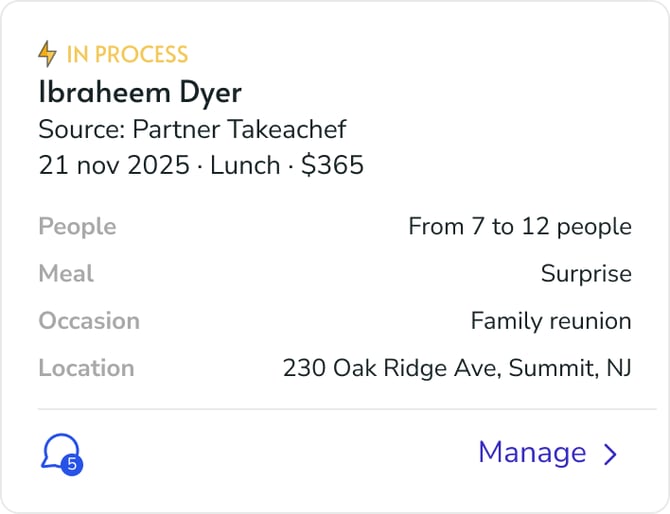
Request list: a request answered by Smart Proposal. The ⚡ next to the status (In process) tells you the proposal was sent for you.
In your messages list
Conversations where Smart Proposal intervened are marked with ⚡ next to the client's name, and the preview shows the note Smart Proposal left for you. It's the quickest way to spot, at a glance, which conversations already have a proposal on the table.
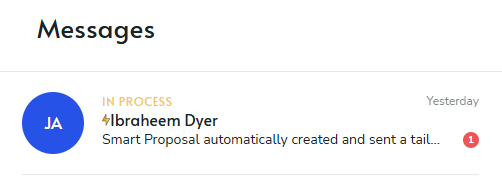
Messages list: ⚡ next to the client's name and the Smart Proposal note in the preview.
In the conversation with the client
When you open the conversation, the first thing you see is a card titled Smart Proposal sent this for you. It confirms that a proposal was created and sent on your behalf and asks you to review the client's note, which appears right below as the client's first message. Only you see this card; the client doesn't. From here you can reply to the client and adjust anything before the booking is confirmed.
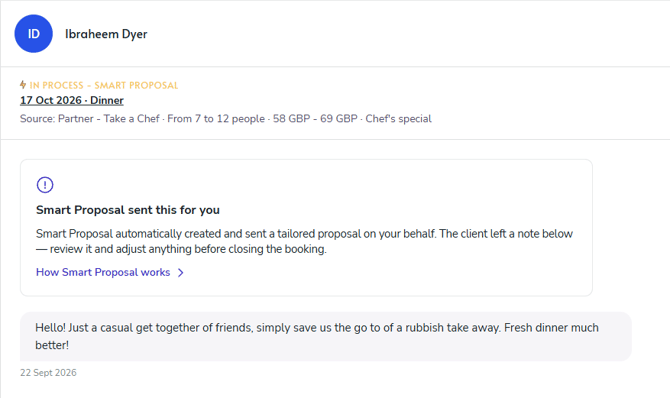
Conversation with the client: the "Smart Proposal sent this for you" card (visible only to you) followed by the client's note as their first message.
In the request detail
At the top of the request detail, a Smart Proposal summary tells you two things: whether any dishes in your menu were swapped, and which of the client's allergies, intolerances, diets or preferences Smart Proposal took into account (for example, "Guest loves fresh dinner"). It doesn't list dish by dish what was replaced; to see the exact swaps, open the proposal and compare its menu with your original. The summary also reminds you that you can edit any dish before the client confirms.
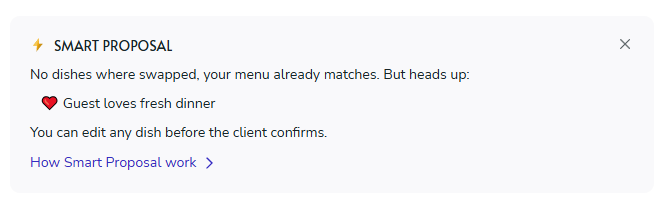
Request detail: the Smart Proposal summary. In this example no dishes were swapped, and the client's preference is highlighted so you can keep it in mind.
In your Smart Proposal page
Your Smart Proposal page keeps a list of your recent automatic proposals, each marked Personalized or Sent as-is, with a link to the detail. It's the quickest way to review everything the system has sent in your name (see the full page in the next section).
From that moment on, the request is yours like any other: you can chat with the client, answer their questions and adjust the proposal until the client confirms. The proposal is already on the table, so you start the conversation with an advantage instead of a blank inbox.
Requests Smart Proposal doesn't handle
Some requests are always handled manually, even if Smart Proposal is active. In these cases you receive the request as usual and answer it yourself:
- Services on 24, 25 and 31 December, 1 January and 14 February (and Thanksgiving in the United States). On these dates every chef answers manually.
- Requests for several services in one booking (for example, a week of dinners).
- Requests that arrive with a campaign or promotional code, or that already have a proposal attached.
- Direct requests to you where none of your menus matches the cuisine or the budget. Instead of losing the request, it's passed to you to answer manually.
Your Smart Proposal page
Smart Proposal has its own page in your chef area. It shows whether it's on, what's limiting it, and everything it has sent for you. It's the only place you need to check to understand what the system is doing in your name.
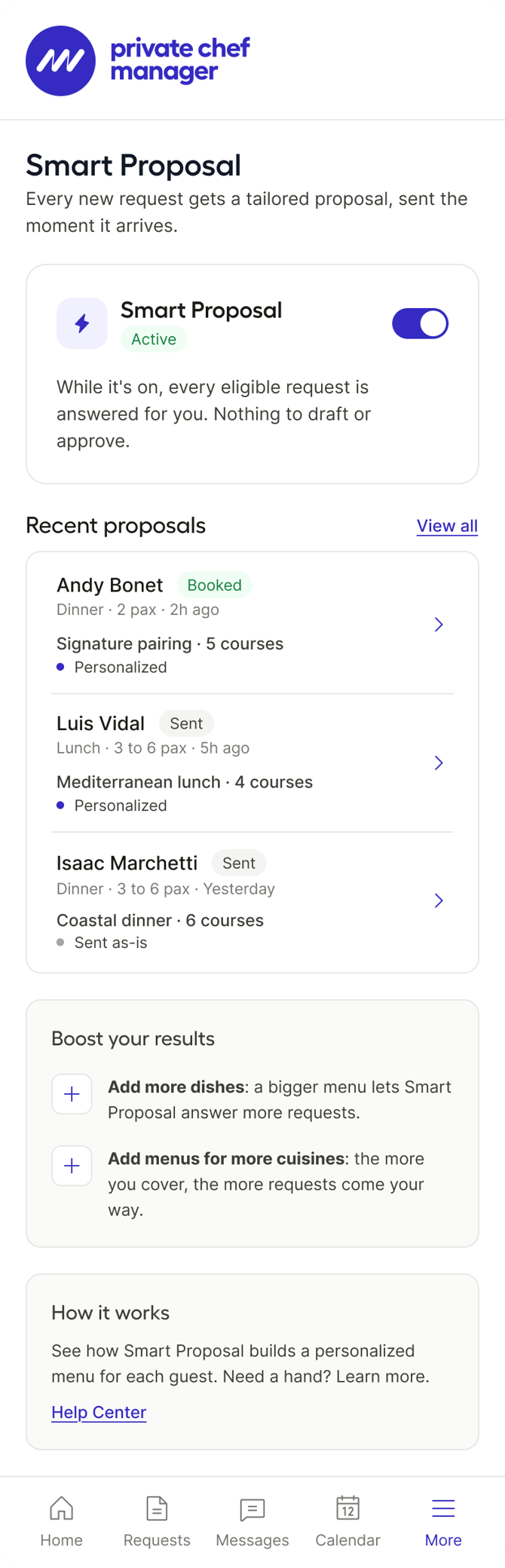
The full Smart Proposal page as a Pro chef with Smart Proposal active: the switch with its status, the recent proposals list (each marked Personalized or Sent as-is), tips to boost your results, and a link to this Help Center.
The switch
When you become Pro, Smart Proposal is on by default. You can switch it off and on whenever you want; the change applies to new requests from that moment. Switching it off doesn't remove you from Chef Match: you keep receiving requests, but you answer them manually.
What the page tells you
The Smart Proposal card at the top of the page always tells you which situation you're in. These are the six possible states, what each one means and what you can do about it.
Active
When you see it: you're Pro and you haven't switched Smart Proposal off. It's the default state for every Pro chef.
What it means: Smart Proposal sends proposals for you whenever a request matches your menus and prices.
What you can do: nothing needed. Check the recent proposals list to see what's been sent, and the pending actions to see if anything is limiting you.
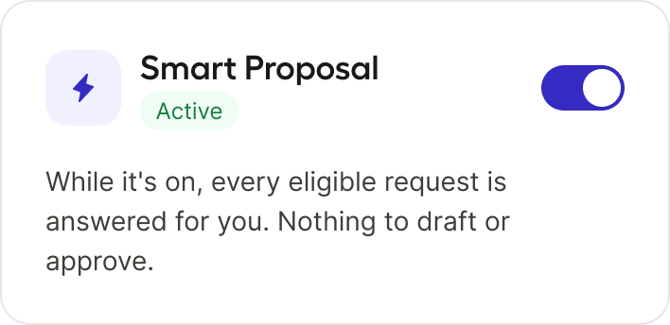
Active: the switch is on and the status reads "Active". Every eligible request is answered for you.
Paused by you
When you see it: you switched Smart Proposal off yourself.
What it means: no automatic proposals go out. You still receive requests through Chef Match, but you answer them manually. The card reminds you what you're pausing: instant replies, menus tailored to each guest and every eligible request answered hands-off.
What you can do: switch it back on whenever you want; it applies to new requests from that moment.
.png?width=670&height=935&name=image-20260924-082505%20(1).png)
Paused by you: the switch is off, the status reads "Paused" and the card lists what you're giving up while it's paused.
Deactivated by Admin
When you see it: our team has paused Smart Proposal on your account, usually after repeated cancellations or issues with clients. The banner shows the date and the reason.
What it means: no automatic proposals go out and the switch is locked. You keep receiving requests manually.
What you can do: contact support from the banner. Only our team can lift the deactivation; it isn't lifted automatically even if you fix what the reason describes.
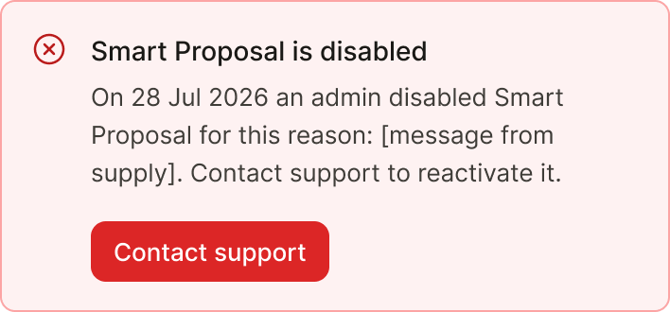
Deactivated by Admin: the red banner shows when and why our team disabled Smart Proposal, with the button to contact support.
Pro active until [date]
When you see it: you have Pro for a limited period (for example, a trial granted by our team) and no payment method added yet.
What it means: Smart Proposal works exactly as for any Pro chef until that date. After it, Pro ends and Smart Proposal switches off.
What you can do: add a payment method before the date to keep Pro and Smart Proposal without interruption.
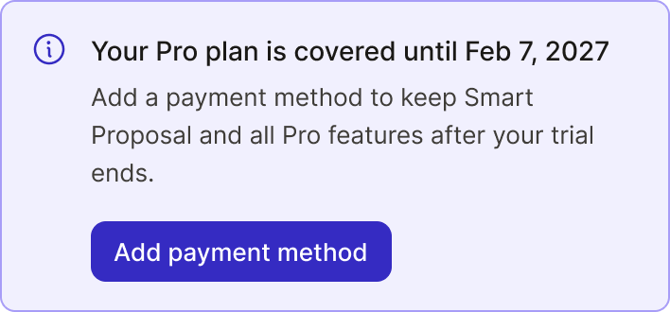
Pro active until a date: the banner shows when your Pro period ends and the button to add a payment method.
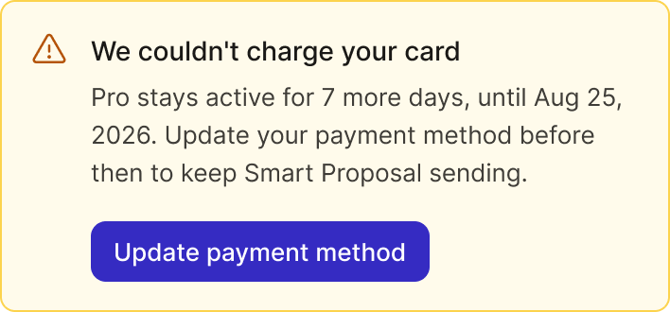
Payment pending
When you see it: your last Pro payment failed and we're retrying it. This lasts a few days at most.
What it means: you keep Pro and Smart Proposal during that time. The banner shows the deadline: if the payment isn't recovered by then, you lose Pro and Smart Proposal switches off.
What you can do: update your payment method from the banner.
Not available
When you see it: you're not on Pro (you never were, you cancelled, or your subscription ended after a failed payment).
What it means: Smart Proposal doesn't send anything for you. The card explains what it does, the switch is disabled and you're offered the Pro plan. You keep receiving requests manually.
What you can do: upgrade to Pro. Smart Proposal activates on its own as soon as you do.
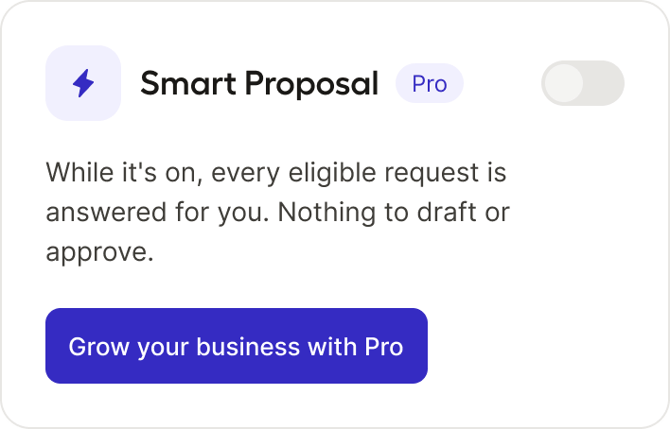
Not available: the view for chefs without Pro. The switch is disabled, the "Pro" tag marks it as a Pro feature and the button takes you to the Pro plan.
Pending actions
Having the switch on doesn't guarantee proposals go out. When something is limiting Smart Proposal, the status changes to Active · limited and a yellow box below the switch tells you what's pending and how to fix it. If you don't see the box, there's nothing to fix.
- You have no published menu. Smart Proposal is on, but it has nothing to send in your name. Create at least one menu for each cuisine you want to receive requests for.
- You have fewer than 25 tagged dishes. Your menus are being sent, but as-is: Smart Proposal can't swap dishes for allergies or diets yet. The box shows your progress (for example, 18 of 25). Create and tag more dishes to unlock personalized proposals.
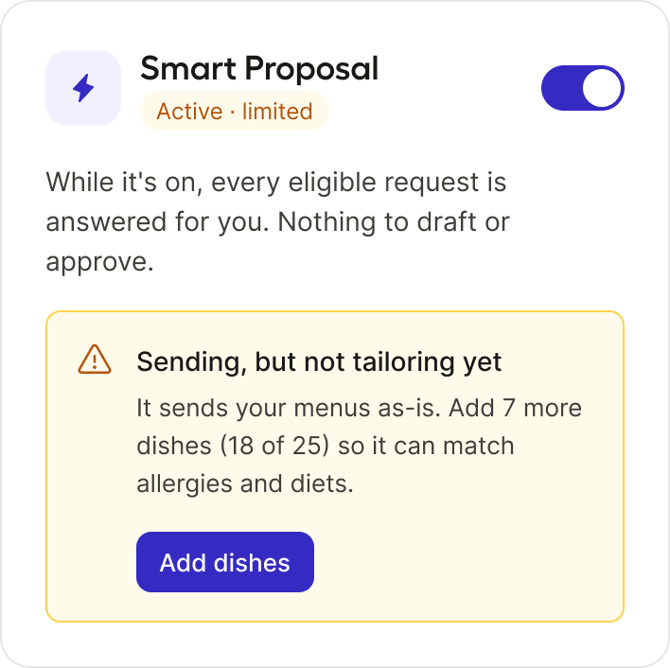
Active · limited, fewer than 25 tagged dishes: Smart Proposal is sending your menus as-is. The box shows how many dishes you're missing and takes you to add them.
If you're not on Pro
Without Pro you answer every request manually, and Chef Match gives you a fair shot at it with a priority window:
- When a request is assigned to you, you receive an email and the request appears in your list marked Reserved for you, with a 20-minute countdown. During that time, no other manual chef receives it.
- When the 20 minutes are up, the request is passed to the next manual chef and your card changes to Open to more chefs · others can send now. You can still send your proposal: the window gives you priority, it doesn't cut you off.
- The only thing that closes the request is the client reaching 4 proposals. If that happens while you're still preparing yours, you'll see a message explaining that the request is complete and you won't be able to send it.
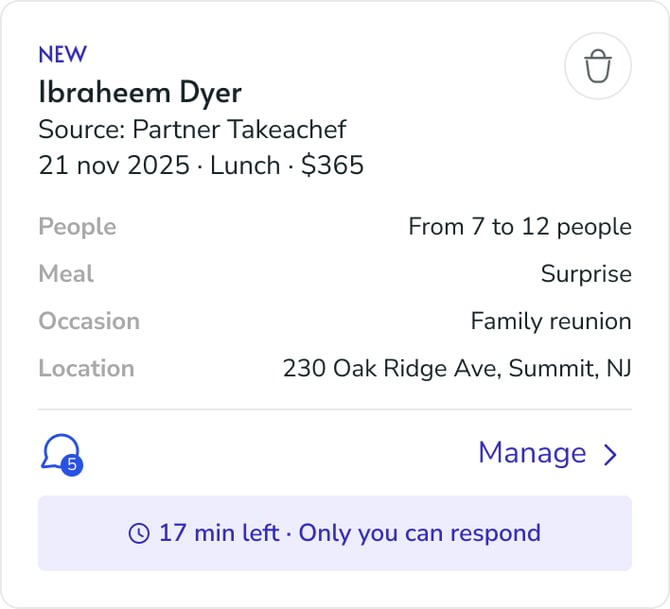
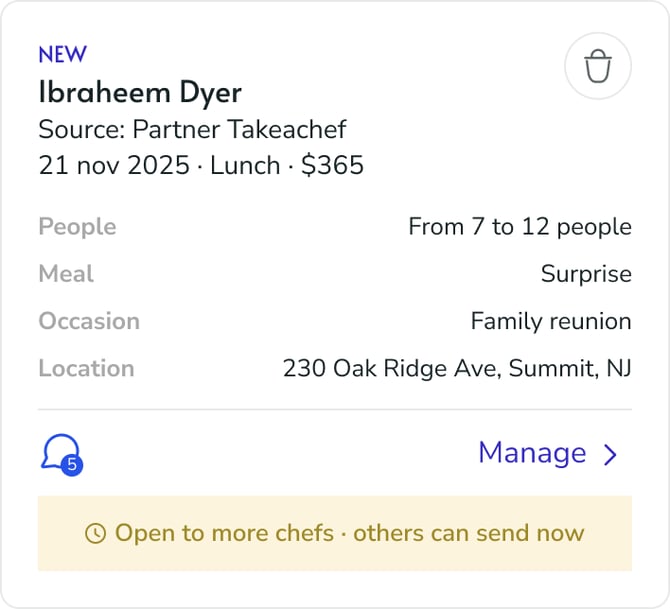
Manual chef, after the 20 minutes: the card reads Open to more chefs · others can send now. You can still send your proposal while the client has fewer than 4.
Meanwhile, Pro chefs with Smart Proposal have usually already answered the same request automatically. That's the reason to consider Pro: with Smart Proposal, your proposal is in the client's hands in minutes, not when you next check your phone.
Frequently asked questions
Can I review or edit the proposal before Smart Proposal sends it?
Not before it's sent: the point of Smart Proposal is to answer while you can't, so the proposal goes out on its own with your published menu (or with dish swaps from your own library). Once it's sent, the request is yours: you can edit any dish in the proposal until the client confirms, and message the client in the conversation as with any other request. If you'd rather approve every proposal yourself, switch Smart Proposal off and answer manually.
Does Smart Proposal send an automatic message from me with the proposal?
No. Today the proposal goes out on its own, with your menu, price and profile. There's no personalised message template to configure. If the menu was adapted, the client sees a short note that it was adjusted to their preferences. You can write to the client yourself as soon as the request appears in your inbox.
Will I get an email when Smart Proposal sends a proposal for me?
Yes. You receive the new request email as usual, and the request appears in your list marked ⚡, with the proposal already sent. Open it to see what was sent and continue the conversation with the client.
How do I know which dishes were changed?
The Smart Proposal summary in the request detail tells you whether any dishes were swapped and which of the client's allergies, diets or preferences were taken into account. To see the exact dishes, open the proposal and compare its menu with your original menu. Only dishes from your own dish library are used as replacements.
Which of my menus does it use?
Only published menus of the cuisine the client asked for, priced within the client's budget range. If you have several that match, the system picks one. It never mixes menus or creates a new one.
Does it check my availability?
Yes. Chef Match only considers you if you have no other service on that date and time slot. Keep your calendar up to date: blocked dates mean no requests, automatic or manual.
Why don't I receive requests even though Smart Proposal is on?
Three usual reasons: the request is outside your area, date, meal type or group size (check your calendar and request settings); none of your menus matches the cuisine or the budget (check the pending actions on your Smart Proposal page); or the request was already covered by chefs ranked above you. Each request goes to a limited group of chefs, ordered by ranking and reviews, so completing services well and keeping good reviews directly increases how often you're selected.
Why did I get a request manually on a date like New Year's Eve?
On 24, 25 and 31 December, 1 January, 14 February and US Thanksgiving, Smart Proposal doesn't send automatic proposals for anyone. These are dates where prices and availability vary a lot, so every chef answers by hand.
What happens to Smart Proposal if my Pro payment fails?
You keep Pro and Smart Proposal for a few days while the payment is retried, and your Smart Proposal page shows a banner with the deadline. If the payment isn't recovered by then, Pro ends and Smart Proposal switches off. Your preference is remembered: if you come back to Pro, Smart Proposal returns to the state you left it in.
Can the Private Chef Manager team turn Smart Proposal off on my account?
Yes, in specific cases such as repeated cancellations. If that happens, your Smart Proposal page shows the reason and the switch stays locked until our team lifts it. You keep receiving requests manually in the meantime.
Get the most out of Smart Proposal
- Reach 25 tagged dishes. It's the threshold that unlocks personalized proposals. Use the dish tool to tag allergens, intolerances and diets; the AI suggests them from the dish name and ingredients, you confirm.
- Publish a menu for every cuisine you offer. Smart Proposal matches by cuisine. A cuisine in your request settings with no menu behind it is a request you'll never answer automatically.
- Cover more than one price range. A menu that falls outside the client's budget is a missed match. Two or three menus at different price points multiply your chances.
- Keep your calendar honest. Block the dates you can't work and leave the rest open. Chef Match trusts your calendar completely.
- Check your Smart Proposal page once a week. Pending actions and the recent proposals list tell you exactly what's been sent and what's holding you back.