---
title: How to book a specific chef
description: Learn how to book your favorite private chef directly on Take a Chef. Follow simple steps to find their profile, submit your request, and confirm your personalized experience.
---
[Skip to content](https://helpcenter.takeachef.com/how-to-book-a-specific-chef#main-content)
English
Show submenu for translations
.png?width=180&height=33&name=takeachef%20(7).png)
Open main navigation
Close main navigation
- English
Show submenu for translations
- [Contact us](https://www.takeachef.com/en-es/contact)
[Contact us](https://www.takeachef.com/en-es/contact)
How can we help you?
- There are no suggestions because the search field is empty.
1. [Take a Chef Help Center](https://helpcenter.takeachef.com/?hsLang=en)
2. [Clients](https://helpcenter.takeachef.com/clients?hsLang=en)
3. [Our Chefs](https://helpcenter.takeachef.com/clients?hsLang=en#our-chefs)
# How to book a specific chef
## Steps to Book the Chef You Want Without Requesting Other Proposals
Want to book your favorite chef without requesting other proposals? Follow these simple steps to make it happen:
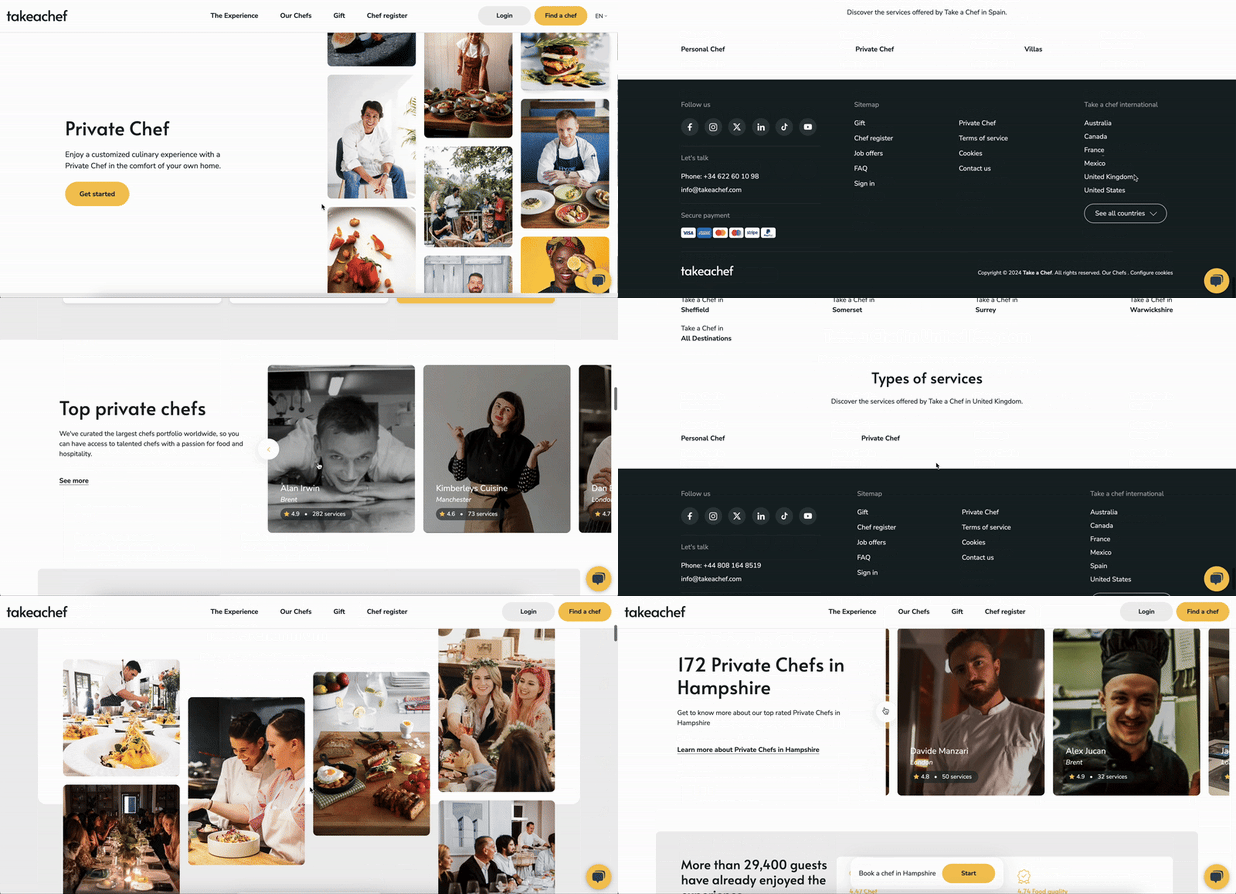
#### **Step 1: Find your chef**
You can locate your preferred chef in two easy ways:
1. **Search for the Chef by Name**
Simply search for your chef's name along with "Take a Chef" on Google to locate their profile.
2. **Search by City**
a) Visit [takeachef.com](http://takeachef.com).
b) Scroll down to select your country.
c) Scroll further to choose your city.
d) Browse profiles of top chefs available in your area.
Need help finding your city? Check out this article: [Find Out if a Private Chef is Available in Your Area.](https://helpcenter.takeachef.com/find-out-if-a-private-chef-is-available-in-your-area?hsLang=en)
#### **Step 2: Submit Your Booking Request**
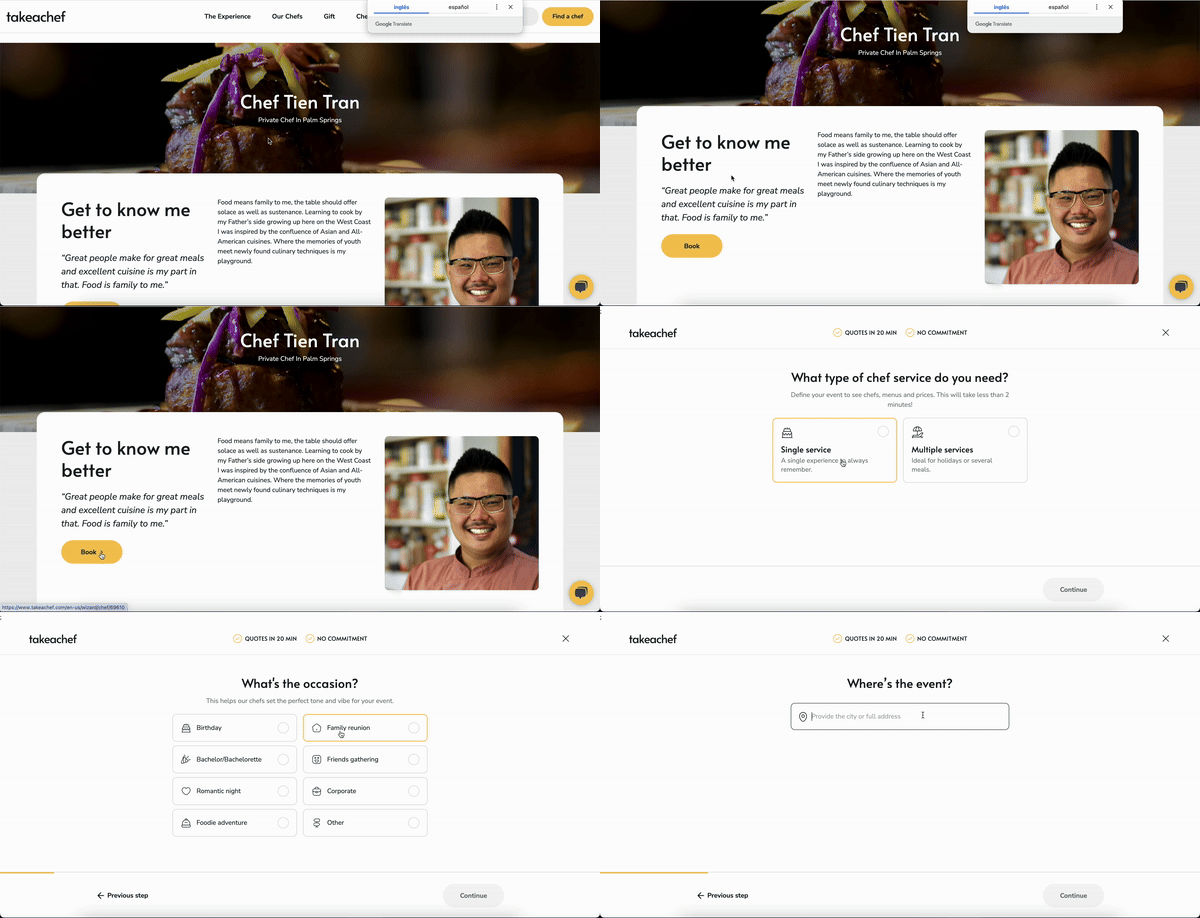
Once you’ve found your chef’s profile, click the **"***Book***"** button. You’ll be directed to a service request form where you can provide details about your desired experience.
After submitting your request, it will go directly to the chef. They’ll craft a personalized proposal and share it with you. You can then review the details, chat with the chef, and confirm your booking.
**Need Assistance?**
If you have any questions or need help during the process, don’t hesitate to [Contact our Support Team](https://helpcenter.takeachef.com/connect-with-our-support-team?hsLang=en). They are here to help you every step of the way!
- [Clients](https://helpcenter.takeachef.com/clients?hsLang=en#main-content)
- [Requesting a Private Chef Service](https://helpcenter.takeachef.com/clients?hsLang=en#requesting-a-private-chef-service)
- [Planning your Event](https://helpcenter.takeachef.com/clients?hsLang=en#planning-your-event)
- [Our Services](https://helpcenter.takeachef.com/clients?hsLang=en#our-services)
- [Our Chefs](https://helpcenter.takeachef.com/clients?hsLang=en#our-chefs)
- [Bookings and Proposals](https://helpcenter.takeachef.com/clients?hsLang=en#bookings-and-proposals)
- [Cancelations and Escalations](https://helpcenter.takeachef.com/clients?hsLang=en#cancelations-and-escalations)
- [Troubleshooting and Support](https://helpcenter.takeachef.com/clients?hsLang=en#troubleshooting-and-support)
- [Payments and Billing](https://helpcenter.takeachef.com/clients?hsLang=en#payments-and-billing)
- [Gift Cards](https://helpcenter.takeachef.com/clients?hsLang=en#gift-cards)
- [Modifications and Add Ons](https://helpcenter.takeachef.com/clients?hsLang=en#modifications-and-add-ons)
- [Chefs](https://helpcenter.takeachef.com/chefs?hsLang=en#main-content)
- [About Take a Chef](https://helpcenter.takeachef.com/chefs?hsLang=en#about-take-a-chef)
- [Account and Settings](https://helpcenter.takeachef.com/chefs?hsLang=en#account-and-settings)
- [Registration and First Steps](https://helpcenter.takeachef.com/chefs?hsLang=en#registration-and-first-steps)
- [Requests](https://helpcenter.takeachef.com/chefs?hsLang=en#requests)
- [Private Chef Manager](https://helpcenter.takeachef.com/chefs?hsLang=en#private-chef-manager)
- [Payouts and policies](https://helpcenter.takeachef.com/chefs?hsLang=en#payouts-and-policies)
- [Partners](https://helpcenter.takeachef.com/partners?hsLang=en)
[.png?width=180&height=33&name=takeachef%20(7).png "Take a Chef logotype")](http://takeachef.com)
[mailto:info@takeachef.com](mailto:info@takeachef.com)
Copyright © 2024, Takeachef