---
title: How to Arrange for Waitstaff or Additional Items with your Chef
description: Learn how to add waitstaff or other extras to your private chef booking. Whether before or after submitting your request, easily communicate with your chef or our support team to arrange additional services based on availability.
---
[Skip to content](https://helpcenter.takeachef.com/how-to-arrange-for-waitstaff-or-additional-items-with-your-chef#main-content)
English
Show submenu for translations
.png?width=180&height=33&name=takeachef%20(7).png)
Open main navigation
Close main navigation
- English
Show submenu for translations
- [Contact us](https://www.takeachef.com/en-es/contact)
[Contact us](https://www.takeachef.com/en-es/contact)
How can we help you?
- There are no suggestions because the search field is empty.
1. [Take a Chef Help Center](https://helpcenter.takeachef.com/?hsLang=en)
2. [Clients](https://helpcenter.takeachef.com/clients?hsLang=en)
3. [Modifications and Add Ons](https://helpcenter.takeachef.com/clients?hsLang=en#modifications-and-add-ons)
# How to Arrange for Waitstaff or Additional Items with your Chef
## Find out how to easily add extra services to your private chef booking.
**Can I request extra services like waitstaff or tables for my booking?** You are welcome to request additional services such as waitstaff or table arrangements — availability simply depends on your chef.
If you haven’t submitted your**[request](https://www.takeachef.com/en-es/wizard/default?card=card_outreach)** yet, mention the additional services you are interested in within the notes section of the booking form. Once you receive personalized proposals, you can confirm directly with the chefs whether they are able to provide these services.
If you have already received proposals, you can discuss any additional services directly with the chef via the platform chat. If the chef is able to accommodate your request, they will include the extras with a separate price that can be added at checkout.
Please keep in mind that not all chefs offer additional services, so confirming availability beforehand is always recommended. If your booking is already finalized, our support team is on hand to help you add and pay for any extras.
### **Step-by-step guide to add and pay for an extra when the service is not yet confirmed**
1. **[Message the Chef](https://helpcenter.takeachef.com/how-to-contact-a-chef?hsLang=en):** Contact the chef through the platform and ask if they can provide the extra service you need, such as a bartender or additional items like drinks. Be clear about your requirements.
2. **Confirmation:** Wait for the chef to confirm whether they can provide the extra service or item. Once confirmed, the chef will update the proposal to include the extra, clearly listing it with its separate price.
3. **Review the proposal:** Carefully review the updated proposal to ensure all details of the extra service or item match your request.
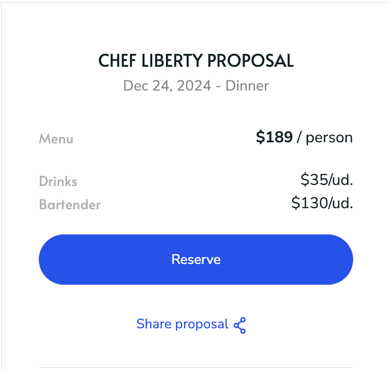
4. **Reserve and Select Units**
- - Click on **Reserve** to proceed with adding extras.
- Select the number of units for the extra you want to include. For example, *3 units of drinks*
*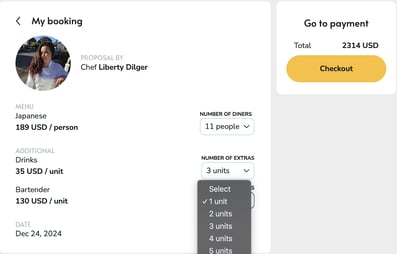*
5. Finally, proceed to **Check Out** and complete your payment to confirm the service and all selected extras.
**Heads up:** If you do not wish to add a specific extra, simply choose the **“***Select***”** option instead of a unit to avoid adding it to your total.
**After Confirming the Service:** If you’ve already completed your booking and would like to add extras, confirm the extra and its price with your chef through the chat. Your chef will then send you a money request. This is a secure payment link sent directly from your booking, showing the extra amount and the reason for it. To pay your money request:
1. Open the payment link we send you by email. You’ll also find it in the chat with your chef: log in to your Take a Chef account, go to My Shopping, click on your booking and open the chat.
2. Check the amount and the reason your chef added.
3. Complete the payment within 48 hours, before the link expires.
Once you pay, the extras are added to your booking and both you and your chef are notified. If you need any help, [contact our support team](https://www.takeachef.com/en-en/contact).
.
- [Clients](https://helpcenter.takeachef.com/clients?hsLang=en#main-content)
- [Requesting a Private Chef Service](https://helpcenter.takeachef.com/clients?hsLang=en#requesting-a-private-chef-service)
- [Planning your Event](https://helpcenter.takeachef.com/clients?hsLang=en#planning-your-event)
- [Our Services](https://helpcenter.takeachef.com/clients?hsLang=en#our-services)
- [Our Chefs](https://helpcenter.takeachef.com/clients?hsLang=en#our-chefs)
- [Bookings and Proposals](https://helpcenter.takeachef.com/clients?hsLang=en#bookings-and-proposals)
- [Cancelations and Escalations](https://helpcenter.takeachef.com/clients?hsLang=en#cancelations-and-escalations)
- [Troubleshooting and Support](https://helpcenter.takeachef.com/clients?hsLang=en#troubleshooting-and-support)
- [Payments and Billing](https://helpcenter.takeachef.com/clients?hsLang=en#payments-and-billing)
- [Gift Cards](https://helpcenter.takeachef.com/clients?hsLang=en#gift-cards)
- [Modifications and Add Ons](https://helpcenter.takeachef.com/clients?hsLang=en#modifications-and-add-ons)
- [Chefs](https://helpcenter.takeachef.com/chefs?hsLang=en#main-content)
- [About Take a Chef](https://helpcenter.takeachef.com/chefs?hsLang=en#about-take-a-chef)
- [Account and Settings](https://helpcenter.takeachef.com/chefs?hsLang=en#account-and-settings)
- [Registration and First Steps](https://helpcenter.takeachef.com/chefs?hsLang=en#registration-and-first-steps)
- [Requests](https://helpcenter.takeachef.com/chefs?hsLang=en#requests)
- [Private Chef Manager](https://helpcenter.takeachef.com/chefs?hsLang=en#private-chef-manager)
- [Payouts and policies](https://helpcenter.takeachef.com/chefs?hsLang=en#payouts-and-policies)
- [Partners](https://helpcenter.takeachef.com/partners?hsLang=en)
[.png?width=180&height=33&name=takeachef%20(7).png "Take a Chef logotype")](http://takeachef.com)
[mailto:info@takeachef.com](mailto:info@takeachef.com)
Copyright © 2024, Takeachef