---
title: Do the Chefs Speak My Language?
description: Find out how to communicate effectively with your chef and ensure a smooth culinary experience. Discover tips on checking language proficiency, connecting with chefs, and making special requests.
---
[Skip to content](https://helpcenter.takeachef.com/do-the-chefs-speak-my-language#main-content)
English
Show submenu for translations

Open main navigation
Close main navigation
- English
Show submenu for translations
- [Contact us](https://www.takeachef.com/en-es/contact)
[Contact us](https://www.takeachef.com/en-es/contact)
How can we help you?
- There are no suggestions because the search field is empty.
1. [Take a Chef Help Center](https://helpcenter.takeachef.com/?hsLang=en)
2. [Clients](https://helpcenter.takeachef.com/clients?hsLang=en)
3. [Our Chefs](https://helpcenter.takeachef.com/clients?hsLang=en#our-chefs)
# Do the Chefs Speak My Language?
## Check if a chef speaks your language and ensure smooth communication during your culinary experience.
Most chefs on our platform are fluent in their local language and often proficient in a second language, such as English, French, or others. Their language skills reflect their diverse cultural experiences and international backgrounds.
If you want to confirm if your chef speaks your language, feel free to connect with them by following the next steps:
**Chat with the chefs (After receiving proposals)**
1. Go to [My Shopping](https://www.takeachef.com/en-pt/extranet/users/user-request) to see your requests.
2. On the request you want to check, Click on **See Proposals**.
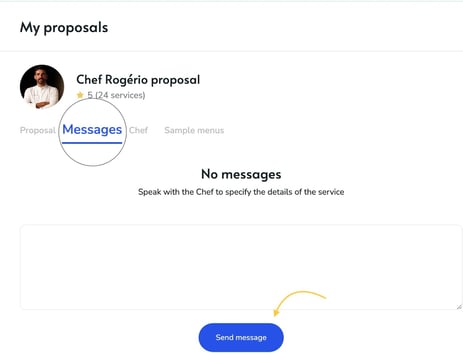
3. Under **My Proposals**, locate the chef you’d like to chat with and click **See Proposal**.
4. Go to the **Messages** tab, type your message, and hit **Send Message** to start a conversation.
**Confirmed Booking:** After booking, you’ll receive the chef’s phone details to have a direct conversation, and ensure everything, including language preferences, is perfectly arranged for your day.
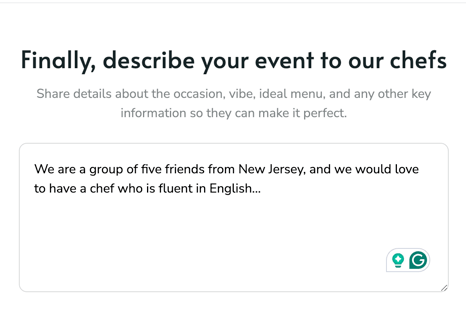
**Request Form:** If you need a chef who speaks a specific language, like French, Italian, or another, include this detail in the comments section of the [request form](https://www.takeachef.com/en-en/wizard/default?card=card_outreach)before submitting your request.
This will help us connect you with chefs who best meet your requirements.
- [Clients](https://helpcenter.takeachef.com/clients?hsLang=en#main-content)
- [Requesting a Private Chef Service](https://helpcenter.takeachef.com/clients?hsLang=en#requesting-a-private-chef-service)
- [Planning your Event](https://helpcenter.takeachef.com/clients?hsLang=en#planning-your-event)
- [Our Services](https://helpcenter.takeachef.com/clients?hsLang=en#our-services)
- [Our Chefs](https://helpcenter.takeachef.com/clients?hsLang=en#our-chefs)
- [Bookings and Proposals](https://helpcenter.takeachef.com/clients?hsLang=en#bookings-and-proposals)
- [Cancelations and Escalations](https://helpcenter.takeachef.com/clients?hsLang=en#cancelations-and-escalations)
- [Troubleshooting and Support](https://helpcenter.takeachef.com/clients?hsLang=en#troubleshooting-and-support)
- [Payments and Billing](https://helpcenter.takeachef.com/clients?hsLang=en#payments-and-billing)
- [Gift Cards](https://helpcenter.takeachef.com/clients?hsLang=en#gift-cards)
- [Modifications and Add Ons](https://helpcenter.takeachef.com/clients?hsLang=en#modifications-and-add-ons)
- [Chefs](https://helpcenter.takeachef.com/chefs?hsLang=en#main-content)
- [About Take a Chef](https://helpcenter.takeachef.com/chefs?hsLang=en#about-take-a-chef)
- [Account and Settings](https://helpcenter.takeachef.com/chefs?hsLang=en#account-and-settings)
- [Registration and First Steps](https://helpcenter.takeachef.com/chefs?hsLang=en#registration-and-first-steps)
- [Requests](https://helpcenter.takeachef.com/chefs?hsLang=en#requests)
- [Private Chef Manager](https://helpcenter.takeachef.com/chefs?hsLang=en#private-chef-manager)
- [Payouts and policies](https://helpcenter.takeachef.com/chefs?hsLang=en#payouts-and-policies)
- [Partners](https://helpcenter.takeachef.com/partners?hsLang=en)
[](http://takeachef.com)
[mailto:info@takeachef.com](mailto:info@takeachef.com)
Copyright © 2024, Takeachef